Showing posts with label composition. Show all posts

Saturday, November 12, 2011

More Experiences with MuseScore

As related in a couple of previous articles, I have become something of an evangelist for MuseScore, the free and open source music notation software that is positioned to completely replace Finale for me. Version 1.0 had shown tremendous promise, and I described my impressions very favorably in my initial article on MuseScore. Based on this, I was motivated to work with the developers in implementing some significant improvements for the 1.1 release, as described in a followup article and also in a tutorial I put together.

With the 1.1 release, I felt confident enough in MuseScore to undertake the task of going through my existing charts and re-creating them with MuseScore. My "book" consists of more than fifty original compositions that had previously been scored in lead sheet form with Finale. Over the course of the past few months, I have been replacing these with MuseScore versions. I finished just this weekend, and as I have been taking advantage of the score sharing site musescore.com to post these charts online, I can post a link to the full set for your perusal and enjoyment:

http://musescore.com/marcsabatella/sets/leadsheets

In honor of the occasion, I would like to share a little about my experience with this project.

The compositions involved range from simple blues heads to multi-page scores of some complexity, incorporating both lead sheet and grand staff (piano) notation as well as some non-traditional notation styles, plus the use of background figures, irregular and multiple meters, and other elements that had pushed the capabilities of Finale when I created them originally.

I am pleased to report that MuseScore did not disappoint. The simple scores were simple to create - easier and faster than with Finale - and the complex scores never required me to compromise my musical intent for the sake of notatability on account of any limitations in MuseScore. And the results were always beautiful. Kudos to the developers of MuseScore for creating such a powerful and eminently usable application!

As an example of one of the more complex lead sheets I created, check out the first page of Down (click the image below to see it larger, or click here to view the full chart on musescore.com):


This arrangement demonstrates the basics of melody, chords, and lyrics, but also shows off more advanced features like switching between single and double staves, notation of accompaniment rhythms using slash notation, time signature changes, etc. All of this is easily accomplished in MuseScore. Although it might not be obvious, this score also presented a number of layout challenges in order to fit it on two pages while keeping it at a readable size. This is one of several compositions for which the MuseScore version is actually a significant improvement over the earlier Finale version.

I have worked on and off for a major publisher over the past few years, producing and editing charts for what has become perhaps the most popular legal fakebook series in the jazz world. I have thus become something of an expert on the preparation of lead sheets for professional publication, above and beyond my own personal experiences as a composer and as a gigging musician. I know what is required in order to produce a good lead sheet, and I can honestly say that MuseScore is the ideal tool for creating charts like those in The Real Book - to name a popular fakebook series that may or may not have been the one that I worked on :-).

I teach at two universities where both Finale and Sibelius are in use, and I often work with students struggling to learn these programs and to produce decent jazz charts with them. This year I started having my students use MuseScore, and I am amazed at how quickly they have been able to produce charts that look far better than those their predecessors created in Finale or Sibelius. Note this isn't to say that Finale and Sibelius are not capable of producing results just as good, or that this process cannot be made easier through extensive customization. But many people don't make the effort to improve on the defaults, and the lead sheet defaults in MuseScore are definitely much better.

During the last few months I also produced several arrangements for larger ensembles (eg, octet and big band). Again I found MuseScore to be the equal of Finale or Sibelius for the most part, although I am looking forward to the "linked parts" feature that will be coming in MuseScore 2.0. I hope to write an article on creating larger scale arrangements will MuseScore sometime in the near future.

Speaking of which, I will be giving a couple of hands-on workshops with MuseScore at the upcoming JEN (Jazz Education Network) / TI:ME (Technology Institute for Music Educators) conference in January. The sessions will cover lead sheets and arrangements. I hope to see some of you in Louisville for this event!

Anyhow, for anyone out there are still wondering if MuseScore is suitable for serious use (particularly in jazz): as someone who has been using it seriously for several months now, I can say most emphatically that it is!

Tuesday, July 26, 2011

MuseScore 1.1 released, lots of improvements for jazz

In an earlier article, I wrote at length about MuseScore, the free and open source notation software. The short version for those who missed it: I said that MuseScore can do almost everything that Finale and Sibelius can do, and I predicted that, despite a few minor limitations, it would completely replace Finale for me.

Since then, I have become more personally involved in the MuseScore project. I haven't done any actual programming - at least, not on the core application itself. But I have contributed some plugins, templates, and other configuration files, I have worked on one of the fonts, and I have helped with the documentation. So I no longer qualify as a completely unbiased observer.

With that said, today, MuseScore 1.1 is released. While it is mostly a bug fix release, we have managed to make some significant improvements with respect to creating jazz charts.

Two of the areas I had mentioned in my previous article where MuseScore needed improvement were in entering chord symbols in places where there are no notes and in creating slash notation. Both of these have been addressed in version 1.1. In addition, the new Jazz Lead Sheet template creates great looking charts right out of the box. An enhanced version of the MuseJazz font allows you to get a handwritten look for titles and other text markings as well as chord symbols. You can also select from a wider variety of chord symbol styles, and it is easier to customize these styles further.

I had written a tutorial on creating lead sheets in MuseScore 1.0, and I have now completely rewritten it for version 1.1. The new tutorial is in two parts: The Basics and Advanced Topics. If you hadn't already checked out MuseScore before, or if you had looked but had not gotten very far with it, now would be a good time:

http://musescore.org/

Here, for example, is the lead sheet I created for the advanced tutorial:


There are more exciting things to come in the MuseScore world over the next few months, and I plan to be sharing those with you soon!

Saturday, February 5, 2011

MuseScore 1.0 - A Milestone in Free Music Notation Software

I'm a big fan of free / open source software. I'm not opposed to commercial software; I'm just frugal. I do a lot of writing, but OpenOffice.org (and its recent incarnation LibreOffice) is more than good enough to render Microsoft Word and other Office applications unnecessary for me. I also use free / open source programs for audio editing (Audacity), for desktop publishing (Scribus), for Web site development (KompoZer), and a host of other tasks.

As a professional composer and music educator who often produces his own teaching materials, though, I hadn't found a free / open source application for music scoring and typesetting sophisticated enough to replace Finale for me. Power users of the other major commercial application - Sibelius - would probably tell you the same thing. If you wanted to produce printed music beyond the simplest of examples, you resigned yourself to spending a few hundred dollars on Finale or Sibelius, and another hundred or so every couple of years for upgrades.

Until now.

MuseScore has been around in some form for almost a decade already, beginning life as the notation engine of the sequencer MusE. I had seen references to it over the years when searching for free / open source alternatives to Finale, which I tended to do whenever I got ready to shell out another Benjamin for the latest Finale upgrade. But MuseScore had always seemed too obscure and too limited in the past to warrant serious consideration.

Over the last couple of years, however, it has really come into its own. I checked it out again a few months ago on the recommendation of one of my students, and was blown away by how far it come since I last looked. I began using MuseScore (version 0.9.6.3) right away and it was able to handle everything I asked it to. While it cannot do everything that Finale or Sibelius can, it comes surprisingly close, and the development team is proving to be committed to improving it further and has been doing so at an amazing pace. Oh, and by the way, MuseScore runs on Windows, Mac, and Linux, and has been translated into over two dozen different language, so it is not just for English speaking PC users like myself.

You may have already encountered MuseScore by now - it's popularity has really soared in recent months. Still, the fact that the version number started with a "0" suggested to most people that the project was still experimental. With today's release of version 1.0, the MuseScore team announces to the world that the product is ready for "real" use, and I wholeheartedly concur.

In addition to the leadsheets and other smaller projects I had been 0.9.6.3 for, I have recently begun using a pre-release version of 1.0 for a relatively large project: taking an orchestra score I wrote a few years ago and adapting it for a jazz octet. I am happy to say that I am finding it at least as capable as Finale in almost all respects, and generally easier to learn and use as well. And of the few time-saving features I miss from Finale, some turn out to be already on the plate and implemented for the next major release.

But there is no need to wait for that next release before using MuseScore. The list of features already in version 1.0 reads like a checklist of things most composers would be hoping for in a Finale/Sibelius replacement: unlimited number of staves; up to four independent voices per staff; MIDI playback and import/export; MusicXML import/export; lyrics; chord symbols; cross staff beaming; slash, drum, and other alternate notation styles; professional spacing and positioning algorithms with manual overrides; incorporation of graphic elements; output to PDF and various graphic formats; output to various audio formats, and much more.

I am no expert in the finer nuances of music typesetting, but MuseScore uses fonts from the GNU LilyPond project, which is often considered the gold standard for typesetting (too bad the latter is not a particularly useful tool when it comes to the actual process of composing). To my eyes, at least, printed scores produced with MuseScore look as good or better than those from Finale or Sibelius. And it is often easier to get great looking results in MuseScore - it is noticeably smarter about collisions between notes in different voices than either Finale or Sibelius is, so less manual positioning of notes may be needed when notating complex music.

I should also note that as with most major open source projects, there is an active and helpful user community, and the developers actually participate in the forums. Unlike the case with most commercial applications, you really get the feeling that bug reports and feature requests from ordinary users are seen and taken seriously. That's why I feel confident predicting that most of the minor limitations I may mention here will be taken care of in the very near future.

To give you an idea of what can be done in MuseScore 1.0, here is a screen shot showing what I've been up to in my orchestra-to-octet reduction. You can click on the image to see it full size:


As you may notice, I have two documents open at once here. The top window pane displays my octet arrangement, the bottom the full orchestra score. I had initially created the orchestra score in Finale, but after exporting it to MusicXML format from within Finale, it loaded into MuseScore with virtually all markings intact - instrument names and transpositions, slurs, dynamics, etc. Using MuseScore, I can actually copy and paste passages from the Finale-created orchestra version directly into my octet version if I wish. I am re-entering the music manually, though, as I wish to gain more familiarity with the process.

Overall, note entry is very straightforward in MuseScore, as are the tools for copying and replacing and other tasks. Simple things like selecting a range of notes and hitting a cursor key to transpose them up or down step by step are like a revelation to me compared to Finale. FWIW, basic note entry in MuseScore is much more like Sibelius than like Finale. I think most unbiased users would probably say is a good thing, although it took me a little while to get used to the difference. Sibelius users should be able to make the adjustment more quickly.

I love that MuseScore allows you to customize keyboard shortcuts for most commands, and within a short time I had developed an efficient note entry workflow that feels very natural to me. I have to say that making this octet adaptation from the orchestra score is probably going as fast in MuseScore as it would have in Finale, despite the original being in Finale format and my having years of experience with Finale but only weeks with MuseScore. Incredible!

Note that while MuseScore supports MIDI input, it is step-time entry only - no transcription of real-time performance. This doesn't bother me; I never found real-time transcription to be a particularly useful in feature in Finale, because it took longer to correct the transcription and make it readable than to simply enter the music myself. You can always record to MIDI in a separate program and then import the MIDI file - this does work in MuseScore. I normally do all my note entry from the computer keyboard in Finale, and that is how I am using MuseScore.

When it comes to MIDI playback, MuseScore can handle both my octet and orchestra scores without difficulty, but current versions of Finale and Sibelius are definitely ahead of MuseScore in terms of realism. Things like playback of articulations (especially slurs) and dynamics make a big difference. If you are trying to produce "studio quality" recordings via MIDI directly from your scores, that is one area where MuseScore falls short. But for simply checking your work, it is fine.

The other major area where MuseScore 1.0 does not measure up to Finale or Sibelius right now is in the generation of individual parts. Linked parts are coming in the next major version, but meanwhile parts must be generated manually, and MuseScore does not provide independent formatting settings (eg, page orientation, staff sizes, margins) for parts versus score. So one can expect this final aspect of a project to take somewhat longer with MuseScore than with current versions of Finale or Sibelius. On the other hand, MuseScore is not particularly worse in this regard than Finale was just a few years ago, and actually, I'd say the generated parts are perhaps closer to being usable right out of the box in MuseScore.

So overall, despite a few limitations, I am very impressed with the facilities MuseScore provides for dealing with larger scale projects. As the above screen shot and discussion suggests, MuseScore has the tools one would need to create anything from a jazz octet arrangement to a full orchestra score, and I am comforted to know linked parts are on the way. But the simplicity of the MuseScore interface also makes it ideally suited for the smaller scale projects a working musician might undertake more regularly.


As a jazz composer, I create a lot of leadsheets, and MuseScore handles these well. Just as I did with Finale, I spent a fair amount of time up front customizing the appearance of chord symbols. The default leadsheet template, which uses the MuseJazz font that comes with MuseScore, does a good job right out of the box. But I elected to configure my own leadsheet template in MuseScore to use the Jazz font that came with Finale instead, as I still find that to be my favorite for chord symbols despite trying quite a few alternatives. My customized MuseScore leadsheet template allows me to get results almost exactly like what I get from my customized Finale template, and the actual process of creating leadsheets is much easier in MuseScore than in Finale for all but the most expert Finale users. The simplicity of the MuseScore interface is a real benefit here.

One thing I do miss from Finale is that I had configured my leadsheet template such that I could easily enter chords in mid-measure whether there was a note there or not. Current versions of Finale, I understand, finally make this easier right out of the box, but my template using hidden rests on layer 2 works fine for me in older versions. I couldn't find an entirely satisfactory way of setting up a MuseScore template to allow me to enter mid-measure chords as easily as my Finale template did (hidden rests in voice 2 unfortunately affect stem directions in voice 1), so in that respect it's more like using Finale versions from a couple of years ago and positioning chords or entering hidden rests and flipping stems manually where necessary.

Also, working with slash or rhythmic notation is a little more awkward in MuseScore than in Finale - although no more so than in any but the most recent version of Sibelius. Basically, you create normal notes then change their heads to slashes, and optionally hide their slashes and mute their playback. You also have to get the vertical positioning correct when using this notation in transposing parts. Not a big deal, but not as straightforward as Finale's "Staff Styles" (or, presumably, whatever Sibelius has finally done in its latest version).

There are only a few other small areas where I find MuseScore 1.0 a bit more cumbersome than I would like. While there are keyboard shortcuts for most functions, and many can also be activated with a click or double click, a few operations (eg, adding key signatures) can only be achieved by dragging and dropping, which I find inefficient. And while the program does a great job of automatically positioning most elements, and most default behaviors make sense, manual intervention is still sometimes required at times when it seems it should not be (eg, for multiple repeat endings).

But aside from these few minor complaints, MuseScore is very powerful and easy to use overall; certainly easier to learn and use than Finale and almost as powerful. And of course, were I just coming to Finale from MuseScore, I would doubtless find plenty of things to quibble about in Finale - there are just different things that are easier or harder between the two programs. In fact, my list of complaints looks no more significant to me than a list of differences between Finale and Sibelius, or between one version of one of these programs and the next. Really, the capabilities of all three programs are more similar than different.

But considering that I am comparing version 1.0 of a free / open source application against a $600 package that has been maturing since the 1980's (Finale) and an equally expensive if not quite as venerable challenger (Sibelius), I think it is truly remarkable that the differences come down to such minor details. Even if one of those differences turns out to be a deal breaker for you right now, I project that within a year or so at the rate the developers are working, there may be no reason at all why MuseScore could not completely replace Finale or Sibelius for almost all purposes.

But again, even this 1.0 release should satisfy the needs of most users. I have already been recommending MuseScore to my own students looking for music notation software, and now I can recommend it for educational institutions and professionals as well. There are many things one can spend the better part of a thousand dollars on; music scoring software no longer need be one of them.

So if you're in market for notation software, MuseScore should be on the short list of contenders, and considering that it is free, there is a good chance that it will end up at the top of that list for you. I urge you to check out MuseScore even if you're happy with your current scoring package but are open to other options that may turn out to provide advantages in the long run. I for one believe I have bought my last Finale upgrade.

Thursday, December 4, 2008

Hymn For Peter

Dedicated to Peter Fopeano (1965-2008)

Listen to a (simulated) orchestra playing my composition, "Hymn for Peter"

My wife Wendy's family has a large Thanksgiving gathering every few years, with relatives coming in from all over the world. Although he would sometimes make the trip for part of the time, her youngest brother Peter was never able to be with us on Thanksgiving day itself, because he worked at a casino and Thanksgiving was one of their busiest days of the year.


Peter lost his job earlier a few months ago, and while that is seldom a good thing, one silver lining was that he was going to be on Thanksgiving for the first time in many years. Although this year was not going to be one of the large worldwide gatherings, my wife and I made plans to fly out to Kansas City to celebrate with her immediate family, and Peter in particular.

The morning before we were to fly out, we received news that Peter had been shot and killed while sitting in his car - an unintended victim of crossfire between rivals standing on either side.

Needless to say, our trip to Kansas City took on an entirely different meaning, as our celebration was tempered by mourning. I do not think I can express my feelings about all this in words here in this blog. However, on Friday - the day after Thanksgiving - I had time to sit alone with my thoughts for some time, and not surprisingly, I turned to music for release. I decided to write a composition to perform at Peter's memorial service.

The idea started as a simple tune that I would play on the piano and embellish with improvisation in my usual manner. My model was Don Pullen's Ode to Life, which is a jazz piece that incorporates improvisation but has a classical feel to the composed sections. Because I wished to be alone, I did not compose at the piano (which was in the dining room), but rather in silence with pencil and paper only, in the bedroom where Wendy and I were staying. While this is not my norm, it is not something I have no experience with, either - I composed away from the piano often when I was writing in a classical idiom as part of my degree.

Perhaps for these reasons, when the first few phrases came out of my pencil, I realized I was writing not a jazz tune at all, but a hymn. After writing the basics of the melody and harmony for the first section of the piece, I turned my attention to arranging it in traditional four-part chorale harmony. I think wrote a second section for the piece and arranged it similarly. At that point, I had a completed hymn, but not a clear idea of what I would do with it.

Since I was not at the piano, and I had my computer with me, I entered my hymn into Finale, the scoring software I have used for years, so I could hear it, edit it, and then print it out. At first, when I hit the playback button to listen to the results, it played using the default piano sound. But at some point I started thinking about what it would sound like if it were sung - even though I had not (and still have not) written any lyrics for this. So I changed the sound to a sample of a choir singing "oooh" and "aaah". Although I can't say the results were impressive in themselves, it immediately struck me that the piece really needed to be scored for some sort of instrumental ensemble. The most obvious choice seemed to be a straight rendering of the four-part SATB harmony into the instruments of the quartet: two violins, viola, and cello. I set this up in Finale, and then started considering how I might put together a quartet or even a small string section (with multiple players per part) to record this during the week between then and the memorial.

By the next day, however, it occurred to me that I really wanted to hear how it would sound with a full orchestra. I knew there was no way I could get an actual orchestra lined up to play it such short notice (and indeed, it would be difficult even with no time constraints). But I also know that Finale comes with some fairly high-quality orchestral samples - ones that are often used in film scoring. So I spent most of Saturday and Sunday working on an orchestral arrangement of my hymn.

What I ended up with is a pretty faithful rendering of the original SATB chorale harmonization, using the different colors of the orchestra to add variety, as opposed to actually creating new harmonies and so forth. Over the last few days since returning to Denver, I have continued to tweak this, and while I suspect I'll continue to do in the future, I think this at a place where I would like to share it. So if you have not already clicked the link at the top of this entry, you can do so now.

The memorial service is Monday in Kansas City. I still have not decided if I am going to simply play this on the piano as per my initial plan, or use this recording, or use a recording of a real string quartet that I still plan to try to make between now and then. I may well decided to play it myself, since that in some ways is the most personal expression I can put forward at the service. As a composer, my orchestral arrangement is at least as personal to me as my own playing. But of course, this is not about my relationship to the music - it's about expressing my feelings about Peter.

Peter, this is for you.

Saturday, November 15, 2008

Inspiration

As a person involved in so many creative endeavors - music and art most obviously, but also photography, writing, and even my approach to cooking and other activities - the subject of "inspiration" comes up fairly often. As in, where does my inspiration come from. That is a difficult question to answer, but I would like to share a few thoughts on the matter.


My main occupation is music - specifically, jazz. One of the unique things about jazz is that, compared to other forms of music, one is almost constantly creating. Improvisation is the heart and soul of jazz. In a typical performance, probably 95% of what I play is improvised. This means that each time I play a gig - as I do usually a couple of nights a week on average - I am coming up with several hours' worth of music I have basically never played before. Sure, I am building on foundations that have been laid down already, but most of the specific melodies I play really are created on the spur of the moment. I am accustomed to not waiting for "inspiration" to strike me as if this were an unusual event. I no more require "inspiration" in order to decide what note to play next than I do in order to decide when to take my next breath.


This is in fairly stark contrast to a classical musician practicing a piece over and over so he can perform it pretty much exactly the same way every time. But more importantly, it is also quite different from the image of, say, a writer staring at his typewriter for days on end waiting for a word or two to come out. I come closer to this situation when I am composing, as opposed to improvising, music. Although I know from experience that I can generally compose a tune any time I sit down and put my mind to it. I have not tended to do this very often, but for a while, when I had a regular weekly gig with my quartet, I was writing a tune a week.

For a long time, painting was somewhat similar for me. Virtually all my paintings are landscapes, and virtually all done on location (en plein air). I would make a commitment to myself or a friend or a group (such as a class I might be taking) to show up at a particular time and a particular place and paint whatever happened to present itself that day. I might wander around for a few minutes to find something I liked, and think some about the vantage point that would produce the best composition, how to frame the scene, and how I would approach the painting. But overall, the feeling was almost as automatic as improvising music: just about any time and any place would do, and I would find something to paint as surely as I would find a phrase to play when improvising in jazz.


A couple of weeks ago, however, I hit a point of temporary crisis. I had met a friend to paint at a location we had been to several times before. Very nice scenery, with a river, trees, some interesting old buildings - everything that would normally get me going.


On this occasion, though, I simply could not get inspired. I wandered about with my camera as I always do, taking "test" pictures of various subjects and checking them out on the screen to see if I thought they would make good paintings. Many shots looked perfectly usable, but the overall sense I had was, "been there, done that."


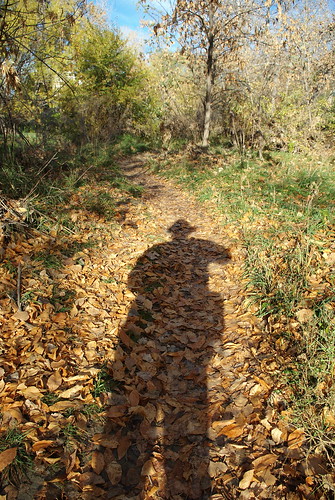
The only two shots I took that excited me were shots that were almost totally unpaintable. Or at least, they could not easily be painted on location. The image at left depended on a quality of light that was not going to last but a minute. The image at right (below) depended on the length of my shadow, which was going to get shorter and shorter the longer I worked - plus the shadow of my easel would have become part of the picture. It would not have been impossible to work around these issues, but now that I had the photographs, I felt no need to go to that much trouble to recreate them as paintings.


I actually considered giving up for the day, as I had been walking in circles for over an hour. But instead, I decided to embrace the idea that inspiration is, or at least can be, important. I still clung to the belief that it should be possible to find something to be inspired by, but accepted that I might have to look harder to find it. In jazz, I always feel I am better off eschewing the obvious and instead going for the less common, but this was one of the first times that the same feeling came over me in painting. I finally got tired - if perhaps only for a moment - of doing essentially the same painting over and over.


In the end, I found something that inspired me - a patch of tall grass that appeared to me like bamboo. In order to really capture what fascinated me about the scene, I sat on the ground on squatted low to give me vantage point where I would be looking up at the top of the grass. This is the type of "unusual" viewpoint that I always admire in photography but seldom think about in painting.

I set up my easel on the ground, too, and painted from this same position. Here is what I ended up with:


The moral? I am not sure. Like I said, I just wanted to share some thoughts. I welcome any comments you may have!